Friday, February 5, 2010

Android Security lockbypass

Intro:

At the risk of letting every user into my Sprint HTC Hero Android version 1.5 phone I am going to publish the steps that allow a user to get past the lock screen that is deployed with the phone.

This is not a full fledged hack, but it is more a temporary way to gain
acc
ess to the device, get the information you need and then leave it with no trace.

When you lock the Android you will notice th
at you can't access
the notifications and the only thing that you can do is make emergency calls
or enter a passcode pattern. This tutorial will show you how to enter the phone through those basic notifications just by calling the phone.


Walk though:
First you will need the phone and the ability to text, call and/or Email the person with the android device. You would have to use whatever means needed (endings of Emails, websites, phone books etc) to find out their cell phone number.

The goal is to get a "missed call" or "new text" icon to appear on the top status bar, this will serve as your entry point into the back end of the phone.
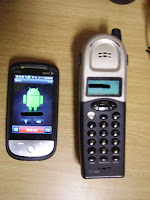
Step 1 - Place a Missed call or Text on the Android
With the phone locked, call the phone from another number. Do not answer the call, you want the missed call to show up in the status bar at the top. I would recommend that you use *67 before calling the phone number to conceal the source but once you have access you can easily d
elete the record anyway.

Note: Know that sprint logs all calls to their devices, as do many other carriers. Using a VOIP phone or google voice could work well to preserve the anonymous connection. Alternatively you could send a SMS message, Email, or other notification that you know will show up on the phone.
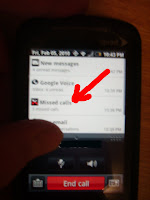
Step 2 - Place call and access phone
After leaving a missed call on the phone, call the Android again. T
his time answering the call on the Android device, leaving both phones on the hook to keep a open connection going.
Next, while the call is in progress, slide the notifications bar down. This time it will work, unlike when the phone was locked.
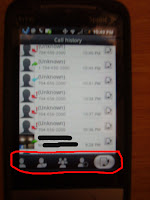
Pressing the missed call notification will allow you access to all past phone calls (left).


Step 3 - Begin traversing through phone
From the call history screen (right) you can see that there are buttons to access the list of contacts on the android.By using these buttons I was able to do the following:
  • Viewed most contact's current Facebook activity
  • Send and view recent texts
  • Make new calls and view all call history
  • Open browser and access sites with "remember me" checked, triggered by opening text containing a URL
Limitations to this hack would include the following terms and conditions (Which you may agree to by checking the radio box included below).

Agree Disagree
  • You need access to the phone physically (physical hack)
  • You need to know the person's phone number (social hacking)
  • Hitting home button will cause you to leave the screen and require you to execute steps 1 -3 to get back in.
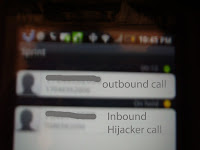

Conclusion:
In order to prevent someone from gaining access to the information on your phone, keep it on you at all times or to use a third party app such as Wavesecure or Mobile Defense (both found in the android market). Wavesecure lets you lock, delete, backup and locate your phone through their website, while Mobile Defense allows you to view multiple device's locations and stats all on one website.


Tuesday, May 26, 2009

Command the burn of Deep Freeze

A few months ago I was working for on a clients network who had a third party come in and setup their network. Unfortunately, many of the PCs were setup with deep freeze. Now for those of you that don't know, deep freeze is this amazing program that allows administrators to lock the hard drive so that users can install software,
download files, etc and then as soon as you reboot the system is back to defaults.
(image Source: http://blog.eches.net/wp-content/uploads/2007/10/deep-freeze-panel.gif)

When you want to change the settings you have to use a keyboard shortcut, Ctl+Alt+Shift+F6 in order to get to a login screen. Then once you type the password, you can "Thaw" the system. Each Thaw/ Freezed session is determined on how the system was told to boot. The screen gives options to Thaw it once and then once you have rebooted, re-Thaw system on reboot -- without logging back into the Deep freeze control panel.

You can figure out if a system is running deep freeze by looking for the following icon in the systray:

(polar bear, symbal of deep freeze)

However, this didn't work so well for me as I was wanting to install the newest version of office and setup the desktop icons with some new shortcuts, because, you guessed it, they had forgotten the password... So I was left with no way to get the computer changed or was I?

It turns out that Windows 2000, XP (and Vista too I am pretty sure,) have this save mode setting called safemode Command Prompt. Which loads the system with only the minimal components and a command prompt, and this is what allowed me to get access to the system and make changes with out Deep Freeze stopping me.


The how to:

  1. First reboot the computer
  2. Press F8 at boot
  3. Select "Safe Mode" with Command Prompt
  4. Wait for the Desktop to load. It will load windows just as in normal, but it will have a cmd window open... some systems may be locked, so you might need to try default usernames such as username=Adminstartor, password="", or whatever admin user you can get access to.
  5. At the black window that shows C:\ type,"explorer"
  6. This will start windows explorer which will allow you to do most system changes that are needed.

The only limitation of this hack is the fact that many programs will not install, however you can change (or delete Deep Freeze) permanently from the following folders and when you return to normal mode you will have complete control:

c:\program files\hypert~1\deepfr~1
c:\windows\system\iosubsys\persifrz.vxd
(you can easily delete both of these from the command line or explorer)

For more extensive information on deep freeze check out:
Source: http://www.governmentsecurity.org/forum/index.php?showtopic=123
(it is old but seems to still have relevancy)

Just remember you could get in a lot of trouble for modify business or school network computer systems... and I won't be there to thaw you out ;-)

Wednesday, April 8, 2009

Hacked: US Power Grid.

So I thought it was something that could only happen on the movies. But it turns out that we don't have as good security as I thought.

When me and my friend watched Live Free Die Hard 2 weekends ago we were both concluded that our Power grid isn't well connected enough to get a nation wide hack. However it looks like a firesail could be possible. According to the NY times Russian and Chinese Hackers have gotten in and placed backdoor software into computers that operate our powergrid. Right now the Government isn't releasing any detailed information and we don't know if this was government run attack or a independent. See full story below:


http://www.nypost.com/seven/04082009/news/nationalnews/re_volt_ing_spies_hack_into_us_power_gri_163443.htm

Blogged with the Flock Browser

Sunday, January 11, 2009

CES 2009 - TV's Lets compete: 3d, slimest, and maybe some Wireless to go.

At the show there seemed to be a competition between LG, Pansonic, and Samsung on who could create the largest exhibit with the most flashing gadgets.

Keypoints of...


Samsung:
Name: Not set yet
Prototype size: 6.5 mm
Launce date: Unknown for thin, but 3d ready  plasma TVs ready by this spring


Panasonic:
Name: Prototype name z1
Prototype size: 1/3 "
Launch date: 2010
Special:
Wireless will hook up maybe to box which has feeds of hd cable
Panasonic had 5 Movie theators sporting new 3D technology and also a showcase
off how home theators could easily migrate their systems to the new 3D standards. 

LG:
Name: Plasma TV 42PQ65C
Launching: This spring
Special: 
Showed of new Plasma and LCD TVs that save on energy. One of the reps I spoke to 
told me they see consumers wanting to save on energy prices as well as get the same
features that they have seen in the past and expect in the future.


Federal Communications Commission Commissioner Talks on Technology Issues

Here is a video that was taken yesterday at the Panasonic Exhibit with the FCC Commissioner.

Saturday, January 10, 2009

CES 2009 - Jan 9 - Instant on, more 3D and larger exibits

Intro
The next official day of the show is a blast. I move over to the Convention center which exhibits the large TV players (Samsung, Panasonic, LG... which will be show in a future post) and Microsoft. Once again the focus was a lot of 3D, as well as some other very creative technologies.
(see below for another slide on pictures from the show)

Body

The first technology that blew me was Fulton. They have been working over the last 12 years and have successfully created a new type of convection system allows for wireless power. The first part consists of a coil with smart electronics that can go under a table or desk. The second part consists of a coil which goes in the devices to be charged. They use magnetic residence to get the energy to transfer which prevents wasted energy.

This is a old technology but what makes it practice is that fact that it has smart electronics to control the amount of energy being transferred. This prevents the problems of short outs that previously prevented this from being used. Now in theory it could go over 3 feet and could be put into an entire table top so you can imagine were they may take this technology.


The next technology that I found very interesting was phoenix technologies new instant on Laptop. They have used a custom version of Linux paired with a technology know as VT which they happened to be embeded in most PCs less than 2 years old. I have to say the guys at the exhibit were very open and easy to talk to... providing a lot of insight into their technologies. They also invited me to their private party at V bar in the Venetian were I talked to 2 of the engineers behind the technology. He said they had been working it for about 3 years and with the expansion of distributions such as Ubuntu as well as Yahoo, Mccafee and other companies developing tools for Linux it has allowed them to put this together so that really you can get online instantly while you wait for Vista or your other OS to come in in the background.

End Notes

Later today or tomorrow I will be posting on TVs and the exhibits I see today. As well as more details on other exhibits.

Edit: Fixed some problems with the slide show not playing.

Friday, January 9, 2009

CES 2009 - Rising up in 3D

Intro:
As many of you know most of my blog focuses on the area of security, but when I got the unique opportunity to go to CES 2009, I couldn't pass up the chance to do a little blogging about the show.

The show, which is held in Las Vegas, Nevada, reports 130,000 visitors to their 2700 exhibits and many sessions. I also have been enjoying the hospitality of vendors such as Imagination and ViewSonic who allowed me to be present at their after show receptions.

Body:

Last night I regret to have missed the first keynote address by Microsoft's new CEO Steve Ballmer. But this morning at 8:30AM I heard CEA CEO Gary Shapiro talk about the current state of Consumer Electronics. His predictions for 2009, estimate that it will be a "flat year" compared to the increase of about 6% in 2008. He was not shy in expressing how he feels that the Obama Administration will make great strides as America's first "Digital President." He also stated that CEA will be lobbying for the greater good of Consumer electronics by seeing if new laws pass the following test:

  1. Does it create jobs?
  2. Does it spur new tech?
  3. Does it encourage the best and brightest to come to the US?
  4. Does it reward risk taking?
  5. Does it promote exports?
  6. Will it help deploy broadband?

I felt a lot of his speech focused on the fact of how government and Consumer Electronics need to help each other. However he stated that the members of the industry need to step up and be leaders in order to propel this economy forward.

The next speaker in the Jan 9th Keynote address was Sony CEO and chairman, Sir Howard Stringer. Many of my previous hesitations about Sony were downgraded, by the many products they released. Such as some the new Sony HD Bravo TVs which allow direct uploads from Sony's new wireless enabled Sony CyberShot.

Another interesting feature of the Sony Keynote presentation was announcements from Disney's Pixer who will be producing new 3D movies using Sony's Blue Ray technology and DreamWorks who announced all productions from this point will host 3D animation compatibility.

I decided that it would be better for this first post to upload a slide show of the newest products that were at the show. One of the big things that seemed to come up more than once is the transition of TV to 3D. In his address during the keynote, chief creative officer John Lasster compared 3d coming to movies to the introduction of sound and color to tvs.

Take a look at the following slideshow for what I captured on Jan 9 at CES.

Edit: Fixed Slideshow.